

1. Description
The incident involves suspected abuse of third-party extensions installed in partner ScreenConnect environments.
ScreenConnect is a remote monitoring and management platform used by managed service providers (MSPs) and IT support teams to remotely access, troubleshoot, and manage customer systems.
On November 11, 2026, ConnectWise published a security advisory after receiving reports of unauthorized access to partner accounts and the deployment of unauthorized remote-access software in customer environments.
During its investigation, ConnectWise identified five third-party extensions that may be associated with the activity:
Labtech Plus
RMM Plus
RMM+
RMM Plus Password Link
RMM+ Password Link
Approximately 400 partner environments were identified as having one or more of these extensions installed. ConnectWise disabled the extensions where it could take action remotely and instructed on-premises partners to disable them manually.
The presence of these extensions does not automatically mean that an environment has been compromised. ConnectWise described the action as a precautionary containment measure while its investigation continued.
2. Technical Description
The reported activity involves unauthorized use of ScreenConnect functionality to deploy additional remote-access software across customer environments.
Huntress observed attackers using access to cloud-hosted ScreenConnect panels to execute commands against managed endpoints. These commands were used to install rogue ScreenConnect clients and an additional malicious toolkit identified as SCKit.
The investigation revealed the following details:
Affected Platform: ConnectWise ScreenConnect.
Incident Date: November 11, 2026.
Activity Type: Unauthorized remote access and deployment of rogue remote-access software.
Affected Extensions: Five third-party extensions identified by ConnectWise.
Partner Environments: Approximately 400 environments had at least one identified extension installed.
Observed Impact: At least 288 endpoints across 48 organizations, according to Huntress.
Malicious Toolkit: SCKit.
Initial Access Method: Not yet established by ConnectWise.
SCKit contains components designed to establish persistent remote access and attempt to intercept ScreenConnect session cookies. These capabilities could allow attackers to maintain access and potentially target technician sessions.
However, Huntress noted that its analysis of the toolkit's attempted propagation from an infected endpoint to a technician's workstation had not demonstrated successful spreading through that method in the recovered logs it reviewed.
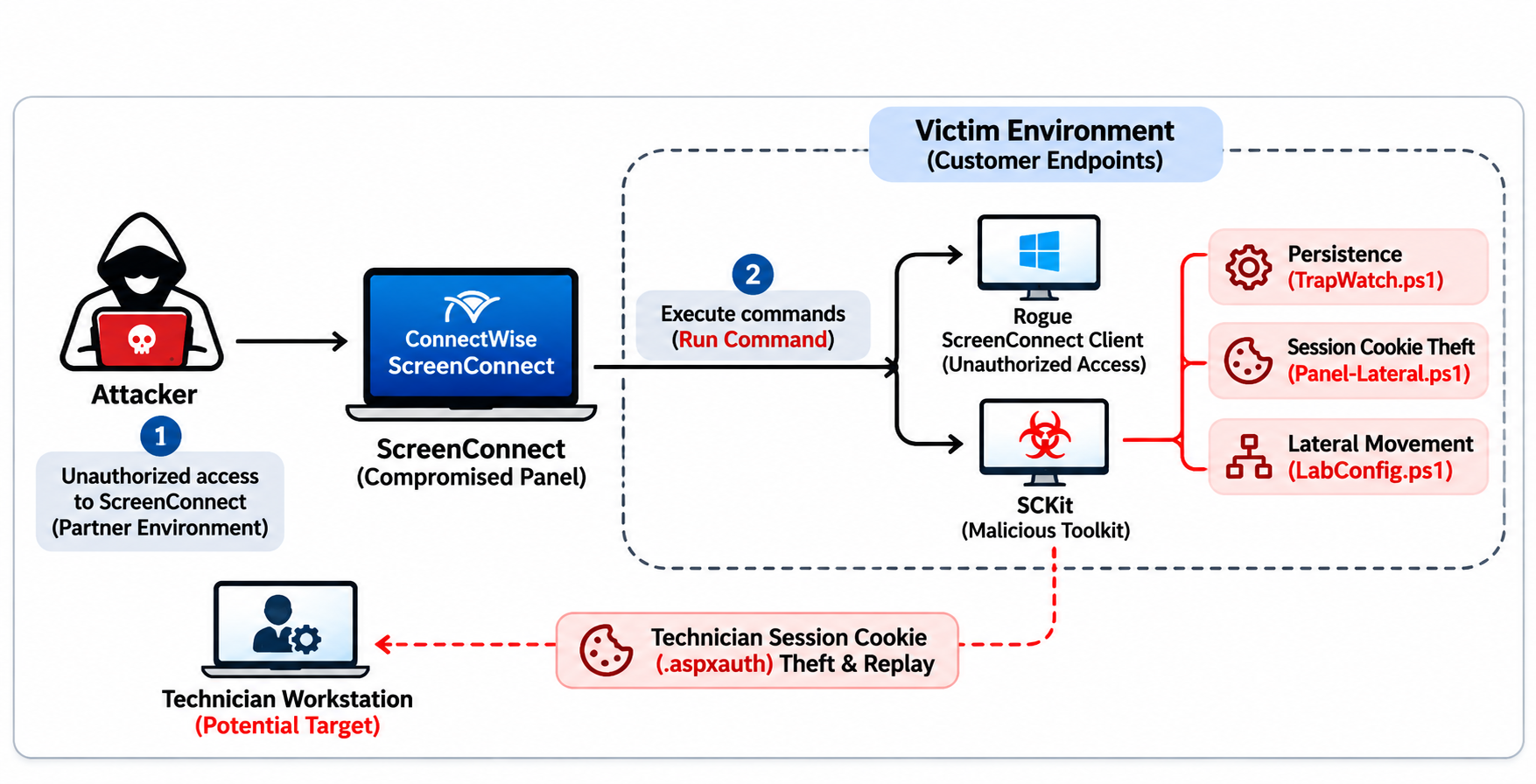
3. Attack Overview
The observed activity demonstrates how attackers can abuse trusted remote-management infrastructure to distribute unauthorized software across multiple customer environments.
1. Access to ScreenConnect Environments
Attackers obtained unauthorized access to cloud-hosted ScreenConnect panels associated with partner environments.
ConnectWise has not established the initial access method. The company suspects that independent third-party extensions may have been abused, but this assessment remains under investigation.
2. Command Execution Through ScreenConnect
After gaining access to the panels, attackers used ScreenConnect's Run Command functionality to execute commands on managed endpoints.
This allowed them to distribute malicious components through an existing remote-management channel.
3. Deployment of Rogue ScreenConnect Clients
The commands installed attacker-controlled ScreenConnect clients on customer systems.
Because ScreenConnect is a legitimate remote-access tool, unauthorized clients can create access that may initially resemble normal remote-management activity.
4. Installation of SCKit
The attackers deployed an additional toolkit known as SCKit.
Huntress identified components that support persistent access and attempts to intercept ScreenConnect technician session cookies.
5. Attempted Lateral Movement
SCKit includes functionality designed to steal ScreenConnect session cookies from technician workstations and attempt to reuse them against the management panel.
This could potentially allow an attacker to access additional sessions available to the technician.
However, Huntress reported that this particular propagation method had not succeeded in the recovered host logs it examined.
6. Multi-Organization Impact
Huntress observed the activity across at least 288 endpoints belonging to 48 organizations. The affected systems were managed through ScreenConnect environments associated with multiple service providers.
4. Technical Analysis
1. Abuse of Legitimate Remote-Management Tools
The incident demonstrates how attackers can misuse legitimate RMM platforms to execute commands and distribute malicious software.
ScreenConnect is designed to provide technicians with remote access and system-management capabilities. When attackers obtain unauthorized access to its management interface, those same capabilities can be used to execute commands on connected endpoints.
This approach can make malicious activity harder to distinguish from routine IT administration.
2. SCKit Malware Components
Huntress identified SCKit as a custom toolkit associated with the activity.
The toolkit includes several components designed to support remote access and session interception.
TrapWatch.ps1
Huntress identified this PowerShell component as a persistence mechanism. It runs as SYSTEM at regular intervals, monitors legitimate ScreenConnect clients, and attempts to take over their connection slots.
Panel-Lateral.ps1
This component is designed to steal the .aspxauth session cookie from a technician workstation and attempt to replay it against the ScreenConnect panel.
LabConfig.ps1
This component provides supporting functionality for the session-cookie interception and lateral-movement process.
The recovered toolkit also contains scripts and utilities associated with deployment and lateral-movement attempts.
These findings indicate that the attackers were not relying only on a single unauthorized remote-access client. They used additional components intended to maintain access and potentially expand their reach through technician sessions.
3. Session Cookie Theft
Session cookies are used by web applications to maintain authenticated user sessions.
If an attacker obtains a valid session cookie, they may attempt to reuse it to access an application without completing the normal authentication process again.
In this incident, SCKit's Panel-Lateral component was designed to capture the .aspxauth cookie from a technician workstation and attempt to replay it against the ScreenConnect panel.
This creates a potential risk because technicians may have access to multiple customer sessions through a single management environment.
Huntress reported that its reviewed host logs did not show successful propagation through this specific technique. Therefore, the presence of the capability should not be treated as proof that technician sessions were successfully compromised.
4. Abuse of Third-Party Extensions
ConnectWise identified five independent third-party extensions that may be associated with the incident.
The extensions were disabled as a precaution across approximately 400 partner environments.
Importantly, ConnectWise has not confirmed that the extensions themselves contain a vulnerability or that their presence alone indicates compromise.
The initial access vector remains under investigation.
5. Indicators of Compromise (IOCs)
The following indicators were published in reporting based on the investigation and Huntress research. They should be used as investigation leads and validated against local telemetry.
IP addresses
Indicator | Type |
|---|---|
| IP address |
| IP address |
Domains
Indicator | Type |
|---|---|
| Domain |
| Domain |
| Domain |
| Domain |
| Domain |
Files and artifacts
Artifact | Type |
|---|---|
| Batch script |
| PowerShell script |
| PowerShell persistence component |
| PowerShell session-cookie component |
| Batch script |
| Command script |
| Executable |
| Executable |
SHA-256 hashes
3c7a98f0fdb6235b8076319c74dc1085f7b349b6d750416dd0cadb07d7972ec4d2ed7a7bf4f8ac9c7969e9b3a07ebd4dda0d858f372c876ac0a041611698de9a
The first hash is associated with source code for the SCKit trap component. The second is associated with TrapWatch.ps1.
These indicators are drawn from published threat research and reporting, not from a complete official IOC list issued by ConnectWise. Their presence should be investigated in context rather than treated as automatic proof of compromise.
6. Potential Impact
The incident highlights the risks associated with unauthorized access to remote-management platforms, particularly those used by managed service providers to administer multiple customer environments.
Potential impacts include:
Unauthorized Remote Access: Rogue ScreenConnect clients could provide attackers with persistent access to affected endpoints.
Customer Environment Compromise: Attackers abusing MSP management infrastructure could potentially reach systems belonging to multiple customers.
Session Hijacking: Theft and replay of technician session cookies could expose authenticated ScreenConnect sessions.
Lateral Movement: Compromised technician sessions could potentially provide access to additional managed systems.
Business Disruption: Unauthorized remote-access activity may interfere with IT support operations and require affected systems to be isolated and investigated.
Supply-Chain Risk: Compromise of an MSP's management environment can create security consequences beyond the service provider itself.
The actual impact depends on the level of access obtained, the affected partner environment, and whether additional customer systems were compromised.
7. Recommendations
Immediate Actions
Disable Identified Extensions: Verify that Labtech Plus, RMM Plus, RMM+, RMM Plus Password Link, and RMM+ Password Link are disabled in all relevant ScreenConnect environments.
Review ScreenConnect Activity: Examine administrative activity, Run Command execution history, client installations, and unusual remote-access sessions.
Identify Rogue Clients: Investigate unexpected ScreenConnect client installations and connections that cannot be associated with authorized technicians.
Hunt for SCKit Components: Search endpoints for the identified PowerShell scripts, batch files, executables, and published hashes.
Review Technician Sessions: Investigate suspicious session activity and revoke potentially compromised sessions. Review technician accounts and credentials.
Check Customer Environments: MSPs should investigate both their own management infrastructure and the customer endpoints they administer.
Follow ConnectWise Guidance: Keep affected extensions and application connections disabled until ConnectWise provides formal instructions for restoration or re-enablement.
Preventive Actions
Strengthen Authentication: Enforce MFA for ScreenConnect administrators and technician accounts.
Restrict Administrative Access: Limit access to ScreenConnect management panels to approved users and trusted networks.
Monitor Remote-Access Activity: Maintain centralized logs of remote sessions, command execution, client installations, and administrative changes.
Control Third-Party Extensions: Review extension sources, permissions, maintenance status, and business requirements before deployment.
Protect Technician Workstations: Apply endpoint detection and response controls and monitor for suspicious PowerShell activity and session-cookie access.
Apply Least Privilege: Ensure technicians have access only to the customer environments and resources required for their responsibilities.
Review Managed Customer Systems: Establish regular security checks across customer environments, especially after an incident involving shared management infrastructure.
Maintain Incident Response Procedures: Prepare isolation, credential revocation, evidence collection, and recovery procedures for remote-management platform compromises.
8. Conclusion
The November 2026 ScreenConnect security investigation demonstrates how attackers can abuse trusted remote-management infrastructure to deploy unauthorized software across multiple organizations.
By gaining access to ScreenConnect environments, attackers were able to use legitimate remote-management functionality to execute commands, install rogue clients, and deploy SCKit components designed for persistence and session-cookie interception.
The incident also highlights the security challenges faced by managed service providers, where a compromise involving shared administration infrastructure can create risks for multiple customer environments.
Although ConnectWise has not identified a compromise of its own infrastructure or a vulnerability in ScreenConnect itself, the initial access method and full scope remain under investigation.
Organizations using ScreenConnect should disable the identified extensions, review remote-access activity, investigate suspicious client installations, and follow ConnectWise's official security guidance.