
Overview
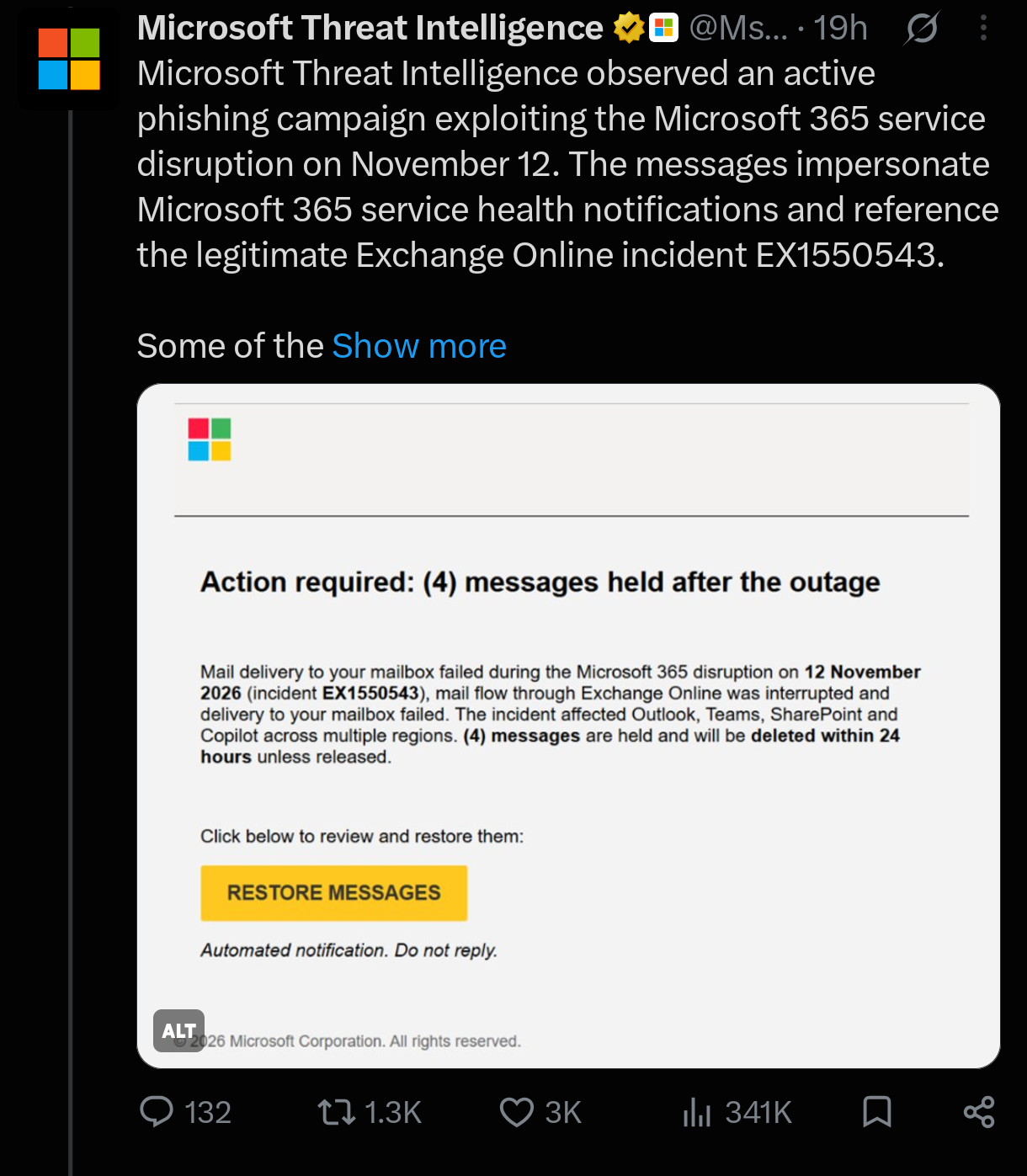
Microsoft Threat Intelligence has identified an active phishing campaign exploiting the Microsoft 365 service disruption that occurred on November 12, 2026. Threat actors are impersonating legitimate Microsoft 365 service health notifications to deceive employees into clicking malicious links.
The campaign references the genuine Exchange Online service incident EX1550543, making the fraudulent messages appear relevant and trustworthy to recipients.
According to Microsoft's November 14 update, attackers are sending emails claiming that messages were held during the service disruption and will be permanently deleted within 24 hours unless recipients click a link to restore them.
This approach uses urgency, service-related confusion, and brand impersonation to increase the likelihood of user interaction.
Attack Methodology
1. Exploitation of a legitimate service disruption
The attackers take advantage of the November 12 Microsoft 365 disruption to create convincing phishing messages. By referencing the legitimate Exchange Online incident EX1550543, they make their notifications appear connected to an actual service issue.
2. Impersonation of Microsoft service notifications
The phishing emails imitate Microsoft 365 service health communications. Some messages detected on November 13 falsely claim that emails were held during the outage and will be deleted within 24 hours unless recipients click a restoration link.
Observed email subject lines follow this pattern:
Outage - [six-character code]
Sender display names use organization-specific prefixes followed by phrases such as:
Outage Notification
Service Health
These details are designed to make the messages resemble internal IT or Microsoft service communications.
3. Suspicious sender domains and redirect infrastructure
Microsoft identified three sender domains associated with the campaign:
moments-notice[.]complanetmaison[.]comnewbooker[.]com
The emails contain recipient-specific SendGrid click-tracking links that redirect users to:
reallifeaccounting[.]com
One observed URL path is:
/themelist0.html
Using recipient-specific tracking links allows campaign operators to route users through redirect infrastructure and potentially track link interactions.
4. Potential credential phishing
The activity is consistent with credential phishing because recipients are encouraged to click a link under the pretext of restoring held messages.
However, Microsoft has not confirmed credential collection or malware delivery in the reported activity. Therefore, successful credential theft and malware infection should not be assumed.
Indicators of Compromise (IOCs)
The following indicators were identified in Microsoft's threat intelligence report.
Indicator | Value |
|---|---|
Sender domain |
|
Sender domain |
|
Sender domain |
|
Redirect domain |
|
Observed URL path |
|
Legitimate incident reference |
|
Email subject pattern |
|
Note: The listed domains are campaign indicators, not proof that every message or connection involving them is malicious. Validate them against organizational telemetry before taking action.
Detection and Investigation
Microsoft recommends using Microsoft Defender for Office 365 Threat Explorer and Microsoft Defender XDR advanced hunting to investigate the campaign.
Security teams should focus on the following areas:
1. Email investigation
Use the EmailEvents table to identify suspicious messages, examine sender information, and locate emails matching the observed subject pattern and sender domains.
2. URL analysis
Use the EmailUrlInfo table to inspect URLs embedded in suspicious emails. Investigate links associated with the identified redirect domain and the observed URL path.
3. User interaction investigation
Use the UrlClickEvents table to determine whether recipients clicked suspicious links. Prioritize accounts that interacted with the campaign URLs for further investigation.
4. Endpoint and account investigation
For users who clicked suspicious links, investigate relevant sign-in activity and endpoint telemetry for unusual activity. If credential exposure is suspected, follow the organization's incident response procedures for account protection and credential resets.
Recommended Mitigation
Organizations should implement the following security measures:
Investigate suspicious emails: Search for the identified sender domains, subject patterns, and suspicious URLs using Microsoft Defender for Office 365 Threat Explorer.
Review user clicks: Examine URL click events to identify employees who interacted with the campaign links.
Verify Safe Links policies: Ensure Microsoft Defender for Office 365 Safe Links is properly configured to provide time-of-click protection against malicious URLs.
Block malicious infrastructure: Apply appropriate email and web filtering controls for confirmed malicious domains and URLs, following organizational security procedures.
Protect potentially exposed accounts: Investigate affected users and take appropriate account protection measures if credential exposure is suspected.
Verify service disruptions: Confirm Microsoft 365 service incidents directly through the Microsoft 365 admin center instead of relying on unexpected email notifications.
Educate employees: Remind users not to click unexpected restoration links or provide credentials in response to urgent service disruption notifications.
Microsoft Response
In a follow-up update, Microsoft Threat Intelligence stated that Microsoft Defender blocks malicious domains associated with the campaign, while Microsoft Defender for Office 365 blocks and quarantines phishing emails.
Microsoft also confirmed that it will continue monitoring the campaign and related threats and share additional findings as they become available.
Conclusion
This campaign demonstrates how threat actors can exploit legitimate service disruptions to make phishing messages more convincing. By referencing a real Exchange Online incident and impersonating Microsoft 365 service notifications, attackers attempt to create urgency and encourage recipients to interact with suspicious links.
Security teams should investigate suspicious emails, analyze embedded URLs, monitor user click activity, and verify Safe Links configurations. Organizations should also ensure that employees confirm service-related notifications through official Microsoft 365 administrative channels.